
About Ben 10 Omniverse: Galactic Champions
Ben 10 Omniverse: Galactic Champions is a turn-based strategy game based on Ben 10: Omniverse. Build a team of alien fighters, choose their moves in battle, and improve their abilities through training. Win fights to earn experience and gold, collect alien DNA, and prepare your team for tournaments.
Gameplay and Objective
Begin by choosing a Hero Watch and selecting your first alien. You can start with Insectoid (Stinkfly), Nosedeenian (Buzzshock), or Splixson (Ditto). Each has different starting values for Strength, Defense, and Agility.
The tutorial introduces Quick Fight, training, and tournaments. Battles take place one turn at a time, with the goal of defeating opposing aliens while keeping your team alive. Winning fights earns rewards that help your aliens develop.
Turn-Based Battles
During combat, select actions using the buttons at the bottom of the screen. Health and energy bars appear above both fighters.
- Attack: Choose an offensive move to damage your opponent. Each alien has its own available attacks.
- Defense: Select a defensive ability to protect your fighter or gain another defensive benefit.
- Item: Use an available item to restore health or energy, increase attributes, or apply another useful effect.
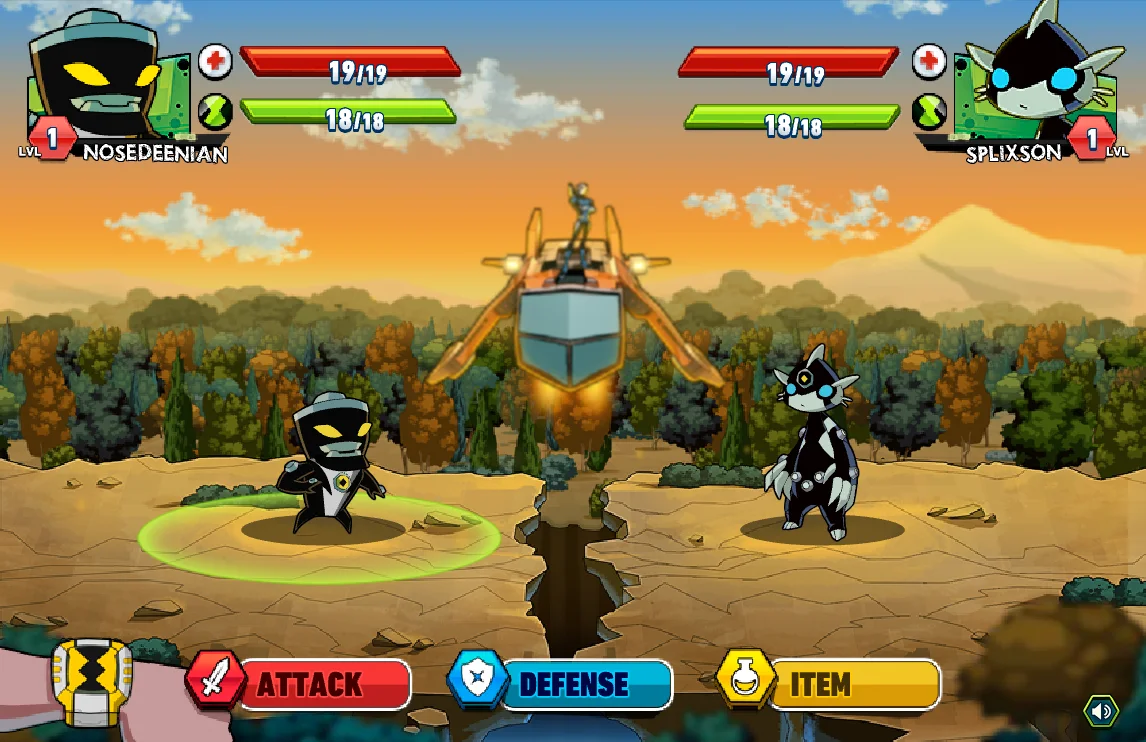
Different attacks and abilities have their own effects. Watch your health and energy before selecting a move, especially during longer battles.
Playable Aliens and Hero Watches
Galactic Champions lets you begin with one of three aliens: Stinkfly, Buzzshock, or Ditto. Each has different Strength, Defense, and Agility stats. The game files also contain eight additional alien species, although their unlock conditions have not been confirmed for this version.
Starting Aliens
- Stinkfly (Insectoid): Uses Scratch, Plasma Ball, and Poisonous Claws.
- Buzzshock (Nosedeenian): Uses Punch, Electric Lightning, and Sonic Punch.
- Ditto (Splixson): Uses Scratch, Cloning, and Sensory Network.
Additional Aliens
- Heatblast (Pyronite): Uses Fireball and Cyclone of Fire.
- Four Arms (Tetramand): Uses Punch and Multiple Punch.
- Humungousaur (Vaxasauriano): Uses Shockwave and Earthquake.
- Big Chill (Necrofriggiano): Uses Ice Flames and Invisibility.
- Spidermonkey (Aracnochimpance): Uses Spiderweb and Fists of Steel.
- Feedback (Conductoid): Uses Electric Release and Energy Release.
- Upchuck (Gourmand): Uses Absorption and Blast Ball.
- Frankenstrike (Transylian): Uses Electrical Fists and Magnetism.
The additional aliens have character assets and ability definitions in the game files, but their availability through normal gameplay has not been verified.
Hero Watches
Before choosing your first alien, you can select from eight Hero Watch designs: Red, Purple, Yellow, and Blue, plus their Evil variants.
Experience, Training, and Alien Stats
Winning battles grants experience. The victory screen displays your alien's level, experience progress, and three primary attributes.
- Strength: Represents offensive power.
- Defense: Represents defensive capability.
- Agility: Represents agility in combat.
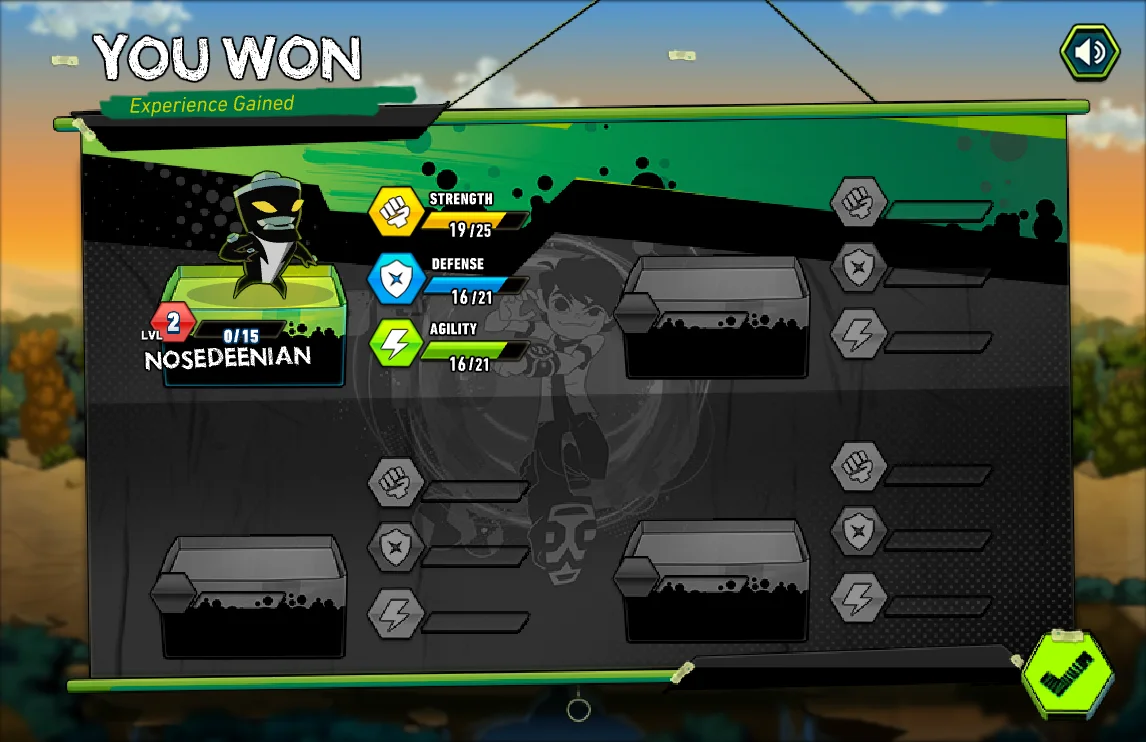
Visit the training area to improve your aliens. Developing their attributes helps prepare your team for more difficult opponents.
Quick Fight, Tournaments, and Items
Quick Fight lets you practice battling different opponents. Tournaments offer structured competitions with requirements and rewards. The game includes tournaments named after locations such as Peptos XI, Aracna, Transyl, Methanos, Anodyne, and Vilgaxia.
Between fights, visit the shop to purchase items using gold earned from battles and tournaments. Available items have different effects:
- Smoothies: Restore health.
- Corrodium: Restores energy.
- Proto-Tech: Increases defense.
- Strength items: Temporarily increase strength.
- Agility items: Increase agility.
- Purify: Removes negative effects.
- Energy Flower: Revives a fallen alien.
Check each item's description before using it, and save valuable resources for difficult battles.
Tips for Playing
- Compare starting stats: Check Strength, Defense, and Agility before choosing your first alien.
- Learn your moves: Every alien has a different set of offensive and defensive skills.
- Manage energy: Avoid spending all your energy early in a battle.
- Use defensive abilities: Protect your alien when facing strong attacks.
- Train regularly: Improve your fighters between battles to prepare for tougher opponents.
- Keep useful items: Save healing, energy recovery, and revival items for difficult encounters.
- Practice in Quick Fight: Learn an alien's abilities before entering tournaments.
- Check tournament requirements: Review the conditions and rewards before entering a competition.
Mouse Controls
- Left Click: Select menu options, aliens, watches, and battle actions.
- Attack: Open the offensive move selection during your turn.
- Defense: Choose a defensive action to protect your alien.
- Item: Select an available item to use in battle.
Battle Tips
- Health: Keep your alien's health above zero to stay in the fight.
- Energy: Check the energy cost of attacks before choosing a move.
- Training: Improve Strength, Defense, and Agility between battles.
Galactic Champions uses turn-based combat. Select an action from the battle menu instead of controlling your alien with movement keys.